징니의 VFX 공방쓰

  • 홈
  • 태그
  • 방명록

Mantra 2

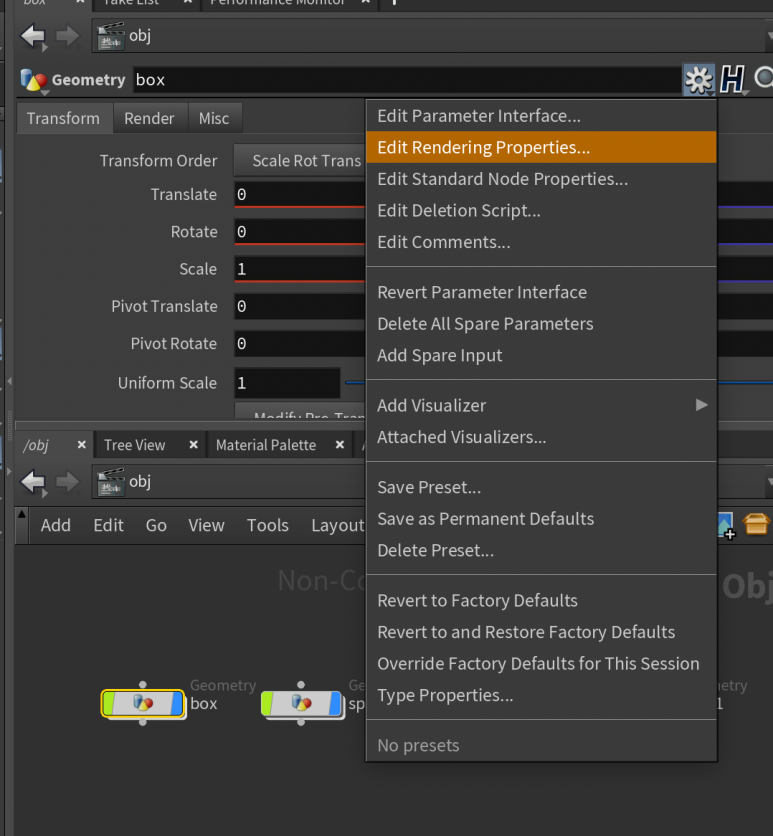
mantra_crytomatte

Edit Rendering Properties 2. Render properties > User 검색 > User 폴더 전체 넘겨주기 > apply ​ 3. User > property , string value 에 같은 name 넣어주기 type : string ​ ​ 4. mantra > cryptomatte > object name 해주기 ​ ​ ​ ​ ​ *** test 해보니, 꼭 name 지정하지 않아도, 랜더 뽑으면 나옴! ​ ​ 각 object 마다 다른 material 넣어주고, ray tracing 으로 랜더하기.
Houdini/Mantra 2022.06.06

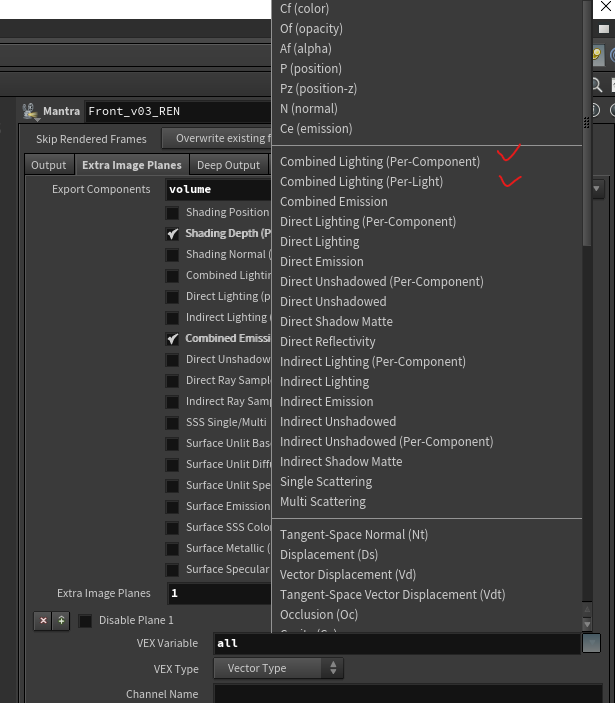
Mantra light pass export

각각 라이트들 개별 패스 뽑을때, combined Lighting (Per-Component) , combined Lighting (Per-Light) 둘중에 하나 선택후, Light Exports : Export variable for each light Light Masks : 옆에 경로 눌러서 라이트 한번씩 눌러서 이름 들어가게 해주고 accept 해줘야한다. 랜더 걸어보면, 라이트 이름대로 패스가 생성된다.

Houdini/Mantra 2022.02.22
이전
1
다음
더보기
프로필사진

징니의 VFX 공방쓰

FX Artist의 메모장 입니다

  • 분류 전체보기 (41)
    • Houdini (33)
      • volume (7)
      • Pyro Sim (5)
      • Filp Sim (7)
      • Particle Sim (0)
      • RBD Sim (5)
      • Mantra (5)
      • Karma (0)
      • Arnold (0)
    • Nuke (3)
    • Vex (2)
    • python (0)

Tag

importpointattribute, constraint_network, rbd_constraint, hard_constraint, attributevop, mantra_render, houdini_crytomatte, dotproduct, Mantra, soft_constraint, houdini constraint, rbd_constraint_properties, glue_constraint, Cos, Houdini, houdini_constraint, houdini pyro, mantra_crytomatte, 후디니, nuke,

최근글과 인기글

  • 최근글
  • 인기글

최근댓글

공지사항

페이스북 트위터 플러그인

  • Facebook
  • Twitter

Archives

Calendar

«   2026/04   »
일 월 화 수 목 금 토
1 2 3 4
5 6 7 8 9 10 11
12 13 14 15 16 17 18
19 20 21 22 23 24 25
26 27 28 29 30

방문자수Total

  • Today :
  • Yesterday :

Copyright © AXZ Corp. All rights reserved.

티스토리툴바